SMS Opt-In Verification
Last updated: June 2, 2026
This page documents how end users of Matchu provide consent to receive SMS messages from our service. Reviewers from The Campaign Registry, US wireless carriers, and Twilio compliance use this page to verify our opt-in mechanism is real and compliant with CTIA guidelines.
How users opt in
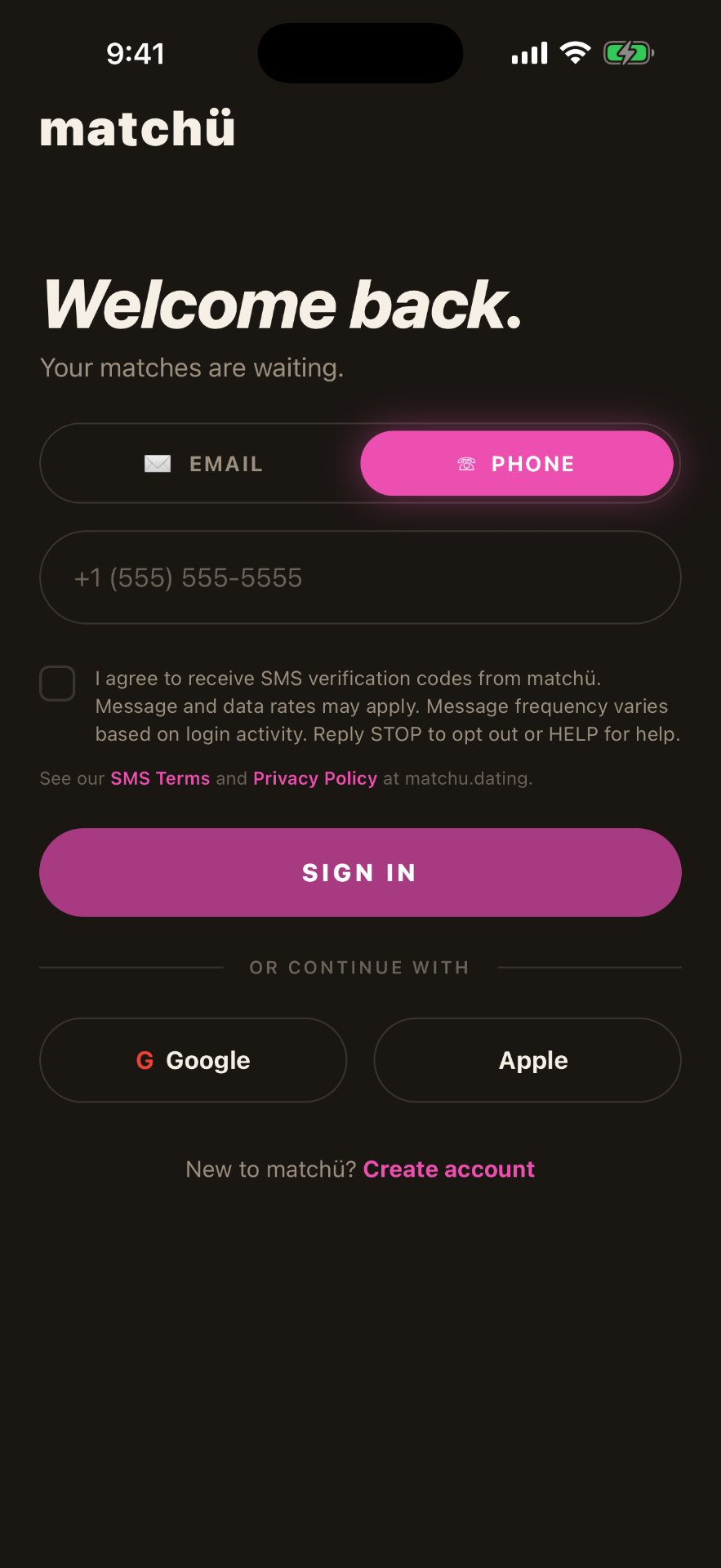
Opt-in to receive SMS messages from Matchu happens exclusively inside our iOS and Android mobile applications and on the matchu.dating website. Every entry point collects explicit consent via the checkbox shown above before a code is sent.
During sign-up or login, the user:
- Taps the "Phone" tab on the sign-in screen
- Enters their mobile phone number
- Checks an explicit consent checkbox
- Taps "Sign in" — which remains disabled until the consent box is checked
Only after these steps does Matchu send a single SMS verification code (OTP) to the entered phone number.
Exact consent text shown in the app
"I agree to receive SMS verification codes from Matchu. Message and data rates may apply. Message frequency varies based on login activity. Reply STOP to opt out or HELP for help."
In-app consent screen
Program description
Matchu sends one-time passcodes (OTP) for account verification.
Message frequency
You will receive messages only when you request a sign-in code. Frequency varies.
Cost disclosure
Message and data rates may apply.
Opt-out instructions
Reply STOP to unsubscribe at any time.
Help instructions
Reply HELP for help, or contact support@matchu.dating.
Carrier reviewer contact
If you are a reviewer verifying this opt-in flow and need a live demo or additional information, contact: legal@matchu.dating